



Table of Content
Created at
Written by
Founder JobCompass.ai
Oct 6, 2025
Share with:
how to write professional emails, email writing, business email etiquette, professional communication
published
When it comes to writing a professional email, I always come back to three simple ideas: be clear, be concise, and be courteous. Your message has to be dead simple to understand, get right to the point, and maintain a respectful tone. Get those three things right, and your emails will get the attention and action they deserve.
Why Great Emails Are a Career Superpower
We live in a world of Slack pings and instant messages, but don't let that fool you. The professional email is still your most powerful tool for communication. It’s not just a digital note; it’s a permanent record of how you present yourself—your attention to detail, your professionalism, and your ability to get things done.
Frankly, learning how to write a great email isn't just about good manners. It's a massive strategic advantage for your career.
Think about the last really good email you received. It probably made you feel respected and confident in the sender. A single, well-crafted email can:
Shape how people see you: It directly influences how your boss, clients, and teammates perceive your competence.
Prevent expensive mistakes: Clear communication heads off the kind of confusion that leads to missed deadlines and project errors.
Build real trust: A thoughtful, respectful email strengthens your professional relationships, whether you're talking to a new customer or a senior executive.
The Hard Numbers Behind Your Inbox
Despite all the new ways to communicate, email isn’t going anywhere. In fact, an incredible 99% of email users check their inbox every single day, and many of them are refreshing it up to 20 times a day.
What’s the very first thing most people do when they get to work? For 58% of professionals, it’s checking their email—before they even look at the news or social media. That constant engagement is precisely why your email skills are so critical. If you're curious, you can dive into more email statistics and see what they mean for your own strategy.
Your inbox isn't just a to-do list; it's the main stage where your professional reputation is built or broken. Every single email you send is a direct reflection of your personal brand.
At the end of the day, every message you send adds to the story of who you are at work. An email riddled with typos can make you look careless. On the other hand, a clear, direct request shows you respect the other person’s time. Mastering this skill means you get to control that story, helping you stand out and build the credibility you need to hit your goals.
Writing Subject Lines That Get Opened
Think of your email subject line as the gatekeeper to your message. It’s the very first thing someone sees, and it’s what they’ll use to decide whether to open your email now, save it for later, or just ignore it entirely.
A vague subject like "Update" or "Question" is a classic mistake. It forces the other person to open the email just to figure out what you want. In a packed inbox, that tiny bit of extra work is often enough to send your message straight to the bottom of the pile. Your job is to make opening your email the easiest decision they make all day.
How to Write Clear, Action-Focused Subject Lines
The most effective subject lines are specific and tell the reader exactly what to expect. They often hint at what action needs to be taken, which helps your recipient immediately grasp the email's priority.
Let’s look at a few quick before-and-after examples:
Before: Meeting
After: Project Phoenix Kick-off Meeting | Friday, 10 AM
Before: Quick Question
After: Question About Q4 Marketing Budget
Before: Follow Up
After: Following Up on Our Call Regarding the Acme Proposal
See the difference? The "after" versions give all the context upfront—the project name, a specific topic, a reference to a past conversation. This simple tweak turns a generic, easy-to-ignore email into a professional, clear piece of communication.
If you’re looking for more inspiration, we have a whole guide dedicated to crafting standout professional email subject lines.
A great subject line answers three questions for the reader in just a few words: Who is this from? What is it about? And why should I care?
Why Personalizing Your Subject Line Matters
Adding a personal touch can work wonders. While we often think of "personalization" in a marketing context, the same idea applies to our everyday work emails. Including a name, a specific project, or a detail relevant only to that person can make your message stand out.
It’s not just a hunch; the data backs this up. A staggering 65% of marketers personalize subject lines to boost their open rates. With the average email open rate sitting around 35.63%, any small advantage you can get will help your message cut through the noise.
Here are a few simple formulas I've seen work time and again:
For Urgent Requests: [Action Required] Project Phoenix Update – EOD Deadline
For Information Sharing: [FYI] Notes from Today's Team Sync
For Scheduling: [Action Needed] Please Confirm Availability for Client Call
Using brackets like [Action Required] or [FYI] is a great pro-tip. It visually flags the email's intent, helping the recipient sort through their inbox with just a quick glance. They'll appreciate you making their job a little easier.
Ultimately, a thoughtful subject line is a sign of respect for the other person’s time. It sets a professional, considerate tone before they’ve even read a single word of your email.
Structuring Your Email for Clarity and Action
A solid wall of text is the fastest way to get your email ignored. I’ve seen it happen a thousand times. The structure of your message is just as important as the words you choose, because it directly controls whether someone understands your point and, more importantly, acts on it.
An email that’s easy to scan is an email that gets results. Simple as that.
The single most powerful principle I’ve ever come across for this is BLUF, or "Bottom Line Up Front." It’s a communication style borrowed from the military, and it’s brilliant. It just means you put the most critical piece of information—the main point or the specific action you need—right at the very top. Don't make people dig for it.
Lead With Your Main Point
Before your fingers even hit the keyboard, stop and ask yourself: "What is the one thing I absolutely need this person to know or do?"
Start your email with that answer. It’s a sign of respect for their time and ensures your core message lands, even if they only skim the first couple of lines. Those opening lines are everything. If you're struggling, you can learn how to craft effective email openings that grab attention immediately.
Let's look at how BLUF works in the real world:
The Vague Way: "Hi team, hope you had a great weekend. I've been reviewing the Q3 performance data and noticed a few trends I wanted to share. We're seeing strong growth in the EMEA region, but APAC is slightly behind target..."
The BLUF Way: "Hi team, Action Required: Please review the attached Q3 performance deck by EOD Wednesday and add your comments to slide 7."
See the difference? The second example gets straight to the point, communicating the action and deadline instantly. No confusion.
Design for Skimming, Not Reading
Once you’ve stated your bottom line, the rest of your email is just for providing supporting context. But here’s the key: most people don't read emails. They scan them. Your formatting has to be built for that reality.
A few practical tips I always follow:
Keep Paragraphs Short: Seriously, stick to one to three sentences max. This creates precious white space and makes the whole email feel less like a chore.
Lean on Bullet Points: If you're listing items, questions, or next steps, use bullet points. They break up the text and make the information pop.
Use Bold Text Wisely: Use bolding to make key dates, action items, or critical details jump off the page. It guides the reader’s eye right where you want it.
A well-structured email isn't just easier on the eyes; it's a mark of respect for your recipient's time. By organizing your thoughts for them, you're doing the heavy lifting, and they'll be far more likely to respond positively.
Always End With a Clear Call to Action
Finally, every single professional email needs a clear and specific call to action (CTA). Never, ever leave someone wondering, "So... what do you want from me?" Vague closings like "Let me know your thoughts" are a recipe for inaction.
Be direct. Be specific. Tell them exactly what the next step is.
The Vague CTA | The Clear and Actionable CTA |
|---|---|
"Looking forward to your feedback." | "Please provide your feedback on the attached draft by 4 PM on Friday." |
"Let me know if you want to connect." | "Are you free for a 15-minute call next Tuesday or Wednesday morning?" |
"Let's touch base on this soon." | "Can you approve this budget request by the end of the day?" |
This level of clarity removes all the guesswork. You’re making it incredibly easy for them to give you exactly what you need. When you master this kind of structure, your emails don't just get read—they get things done.
Finding the Right Professional Tone
The words you choose for an email do more than just pass along information—they create a feeling. Without seeing your facial expressions or hearing your voice, your phrasing alone can project confidence, annoyance, or respect. And sometimes, it happens without you even realizing it. Learning how to write a truly professional email means getting a handle on that tone and making it work for you.
This is a bigger deal than it sounds. How your message is received often comes down to how it feels to the reader. One wrong word can twist a simple request into a demanding order or make a friendly check-in feel unprofessional.
Assertive vs. Aggressive Communication
One of the trickiest balancing acts is staying assertive without tipping over into aggressive. It's a fine line. Being assertive means you're clearly and confidently stating what you need or think. Aggression, on the other hand, sounds demanding, blaming, or just plain blunt.
Let's imagine you need to follow up on a deadline someone missed.
Aggressive Tone: "You missed the deadline. I need that report immediately." This is just asking for a defensive reaction. It’s accusatory and builds tension right away.
Assertive Tone: "Hi [Name], I'm following up on the report that was due yesterday. Is there anything I can do to help you get it submitted today?" This approach is still firm, but it's also supportive and focuses on getting things done together.
That small shift in phrasing keeps things professional while still getting your point across. It's a core part of good professional email etiquette that helps you build good working relationships instead of burning bridges.
Friendly vs. Unprofessional Language
Another challenge is striking the right balance between being friendly and maintaining your professional standing. You want to be approachable, of course, but getting too casual can seriously undermine your credibility. This is especially true when you're emailing senior leadership or new clients.
A good rule of thumb is to avoid slang, a flood of emojis, or overly familiar greetings ("Heyyyy") unless you already have a very casual, established relationship with that person.
Your professional tone is your digital handshake. It should be firm, confident, and respectful, setting the stage for a positive and productive interaction every single time.
Navigating Difficult Conversations
Your tone becomes absolutely critical when you're dealing with tough topics, like disagreeing with a coworker or delivering bad news. Here, the goal is to be direct but also empathetic.
For instance, instead of starting with, "I completely disagree with your approach," which immediately puts someone on the defensive, you could try a softer entry.
Something like, "Thanks for sharing your perspective on this. I was thinking about it from a different angle—could we talk through the pros and cons of another option?"
This language validates the other person's input before you introduce your own idea, which opens the door for a much more constructive conversation. By carefully choosing positive, solution-focused words, you can navigate sensitive subjects without sacrificing your professional and respectful tone.
Closing Your Email with Confidence
Don't let a great email fall flat at the very end. The way you sign off is just as crucial as your opening line—it's the last thing your reader sees. A strong closing cements your professional tone, but a sloppy one can undo all your hard work.
Think of your sign-off as the final, polite handshake of the conversation. The key is to match it to the context. If you're writing to a new client or someone up the corporate ladder, a classic, more formal closing is the way to go. For daily messages to your team, something a bit more relaxed feels more natural and helps maintain that friendly vibe.
Choosing the Right Sign-Off
There isn't a one-size-fits-all answer here, but some options are definitely safer than others. You want your closing to feel consistent with the message's tone and your relationship with the person you're emailing.
Here are a few of my go-to choices and where they fit best:
Best regards: This is the swiss army knife of email closings. It's professional yet friendly, making it a safe bet for almost any business context.
Sincerely: A bit more buttoned-up. I'd save this one for formal situations like cover letters or very serious communications where it won't feel out of place.
Thank you: A perfect choice when you've asked for something. It’s polite, shows appreciation, and gives a gentle nudge for them to follow through.
Best: This is the casual cousin of "Best regards." It's ideal for quick notes to colleagues or anyone you email regularly.
Knowing when and how to follow up is another huge part of professional communication. Once your initial email is sent, circling back without being pushy is a real skill. It's worth learning how to write effective follow-up emails to make sure your messages get the attention they deserve.
Crafting a Clean Email Signature
Think of your email signature as your digital business card. It needs to provide all the essential info without being a distraction. I’ve seen it all—inspirational quotes, huge logos, clashing font colors—and it just comes off as unprofessional.
A great signature reinforces your credibility and makes it easy for people to contact you. Keep it simple, clean, and functional.
At a minimum, your signature should have these three things:
Your Full Name
Your Title and Company
Key Contact Information (Phone number or LinkedIn profile)
This kind of polish really matters. It shapes how people perceive you and your company, and it adds up. Consider that companies see an average ROI of $36 for every dollar spent on email marketing—proof that well-crafted communication pays off.
For anyone on the job hunt, a sharp closing and signature are non-negotiable. If that's you, take a look at our guide on the perfect application follow-up email for more targeted advice.
Common Email Mistakes and How to Avoid Them
We’ve all sent an email we immediately regretted. Even the most careful professionals slip up sometimes, but these small mistakes can cause real headaches—from simple confusion to slowing down entire projects. Knowing what these common traps are is the first step to making sure every email you send hits the mark.
One of the biggest culprits? Firing off an emotional reply. When a frustrating email lands in your inbox, your first instinct might be to type out a heated response. Don't. Seriously, just step away from the keyboard. A reply written in the heat of the moment never ends well and can cause long-term damage to work relationships.
Another easy-to-fix mistake is using an unprofessional email address. If you're still using surferdude89@email.com for work, you're undermining your credibility before anyone even reads your message. This is especially true when you're reaching out to new clients or contacts. Stick to a clean, simple, name-based address. It’s a small detail that makes a big difference.
Forgetting the Details
It’s happened to the best of us. You write a perfect email, mention the super important file you’ve attached, and then… you forget to actually attach it. This classic blunder creates a chain of "Oops, here it is!" emails and can make you look disorganized.
Before you send any important email, take five seconds for a final check. A quick scan for attachments, correct recipients, and glaring typos can save you from a world of professional embarrassment.
Speaking of typos, proofreading isn't optional. An email full of spelling mistakes and grammatical errors sends a clear message: you don’t care about the details. It's a direct reflection of your work ethic, and it’s something people notice right away.
The infographic below shows just how much of an impact a quick review can have on reducing errors and making your message easier to understand.
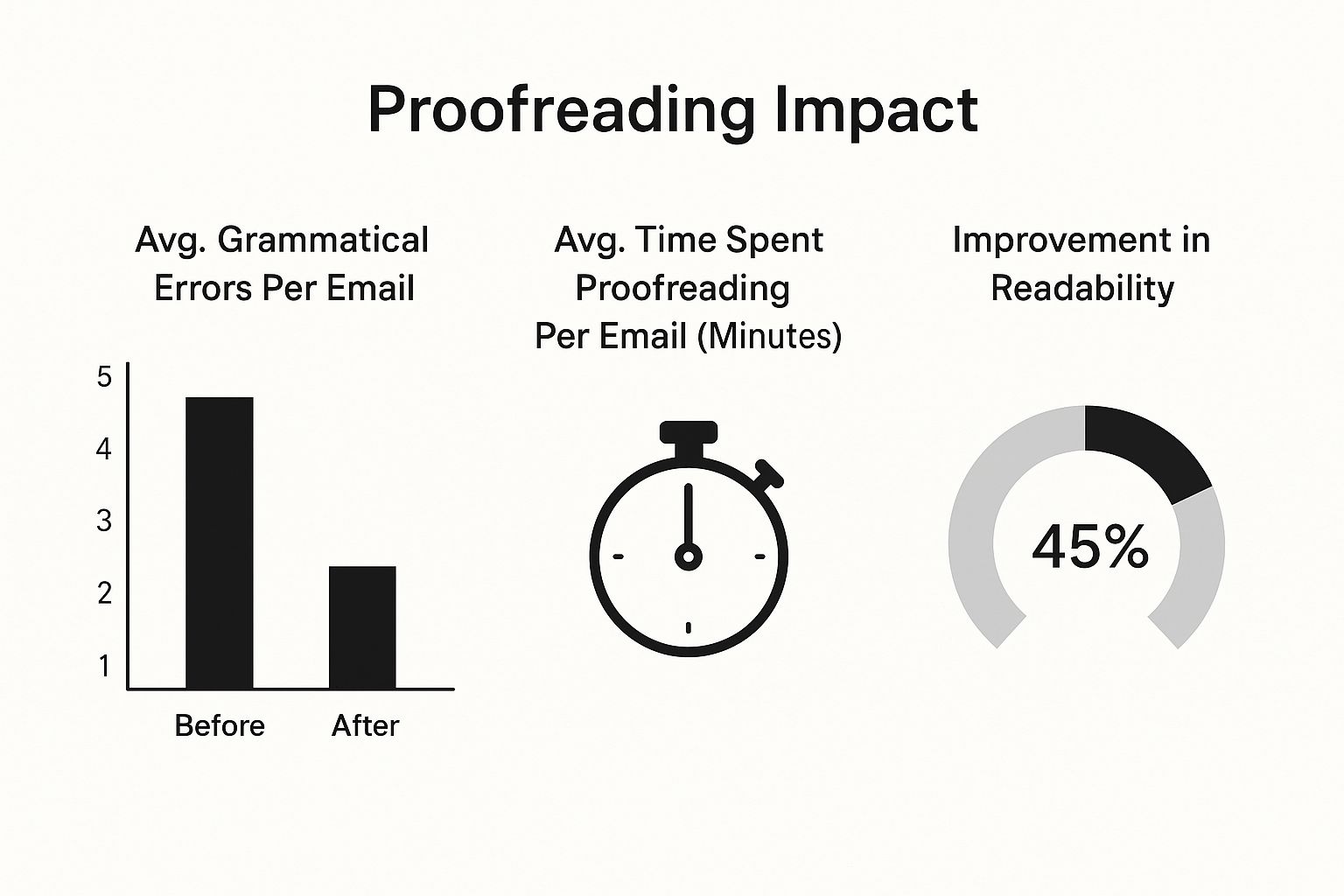
As you can see, spending just a minute or two on a final once-over pays off. By steering clear of these common mistakes, you ensure your communication is always clear, respectful, and effective.
Got Questions About Professional Emails? We've Got Answers.
Even with all the rules in mind, sometimes you just get stuck. A specific situation pops up, and you’re not quite sure what the "right" move is. Let's walk through some of the most common questions people have when they're trying to master professional email.
How Fast Should I Reply to an Email?
A good rule of thumb is to respond within 24 hours during the workweek. It’s a simple sign of respect for the other person's time.
But what if you don't have the answer yet? Don't let the email sit there. A quick acknowledgment can make all the difference. Just a short note like, "Got it, thanks. I need to look into this and will have a full answer for you by end of day tomorrow," manages expectations and shows you’re on the ball.
Are Emojis and Exclamation Points Ever Okay?
This one is all about context. It really boils down to your company culture and how well you know the person you’re emailing. If you're ever in doubt, just leave them out—especially if it's a formal message or your first time contacting someone.
I find that with colleagues I have a good rapport with, a simple smiley face can add a bit of warmth and make sure my tone comes across as intended. As for exclamation points, use them sparingly for genuine excitement, but never in serious or bad news emails.
What's the Best Way to Follow Up on an Email?
Patience is key here. If you haven't heard back, give it at least a few business days before you nudge them.
The cleanest way to do this is to simply reply to your original sent email and add a new, brief message at the top. Something like, "Hi [Name], just wanted to circle back on my email below. Let me know if you have any questions," works perfectly. It’s polite, provides all the context they need, and doesn't come off as demanding.
Ready to stop guessing and start connecting with the right people? Job Compass uses AI to find hiring managers and recruiters, craft personalized outreach messages, and optimize your resume so your applications get noticed. Find your next job with Job Compass.

