



Table of Content
Created at
Written by
Founder JobCompass.ai
Oct 10, 2025
Share with:
how to optimize your linkedin profile, LinkedIn profile tips, professional branding, career growth, job search tips
published
When it comes to your LinkedIn profile, you've got just a few seconds to make an impression. It all boils down to two things right at the top: your professional photo and your headline. Think of them as your digital handshake—they decide whether a recruiter stops to learn more or just keeps on scrolling.
Nailing Your First Impression

Before anyone even gets to your carefully crafted "About" section or your impressive work history, they see your face and the one-liner right below it. These two elements have to work together to instantly signal who you are, what you do, and why someone should care. If you're serious about optimizing your profile, getting these right isn't optional.
Your picture builds a human connection and a sense of trust. Your headline provides the hook, giving them a reason to click. One without the other is a huge missed opportunity.
Choosing a Profile Photo That Actually Works
Your profile picture is more than just a picture; it's a strategic move. The numbers don't lie: just having a professional photo can get your profile viewed up to 14 times more often. It’s a simple change with a massive impact.
A great photo conveys confidence and professionalism before anyone reads a single word. Here’s how to get it right:
Good Light, Clear Shot: Use a high-quality headshot where your face is easily seen. Natural light is your best friend here, so try facing a window. No blurry, poorly-lit selfies.
Keep the Background Simple: A clean, uncluttered background is key. A solid-colored wall or a lightly blurred office setting works perfectly. You want the focus on you, not the vacation photo behind you.
Look Approachable: Your expression should match your professional brand. For most of us, that means a warm, genuine smile. You want to look like someone people would actually want to work with.
When I swapped my own photo from a casual snapshot to a real headshot, I saw a noticeable jump in connection requests from people in my industry. It really does make a difference.
Your professional photo is your digital eye contact. It’s the fastest way to build subconscious trust and make your profile feel credible, encouraging people to take that next step and engage.
Writing a Headline That Stops the Scroll
So many people just list their current job title in their headline. This is a huge mistake. That headline is your most valuable piece of real estate for keywords and showing what makes you unique. Recruiters aren't just searching for "Marketing Manager"—they're looking for specifics like "SEO Strategy," "Content Marketing," or "B2B Lead Generation."
Your headline needs to be a quick summary of who you are, what you do, and who you help. It has to be both searchable and interesting.
Instead of just your title, try a formula like this:
[Your Role] | [Top Skills or Specializations] | [A Key Result or Value You Offer]
Let's see it in action:
Instead of: Senior Accountant
Try: Senior Accountant | CPA | Financial Reporting & Analysis for SaaS Startups
Instead of: Project Manager
Try: Certified Project Manager (PMP) | Driving Agile Transformations & Delivering On-Time Tech Projects
See the difference? This approach immediately tells recruiters and potential connections what you actually do. You go from being just another "Project Manager" to a specialist who delivers clear results. It’s one of the most powerful tweaks you can make. For more ideas, take a look at our guide on LinkedIn profile headline examples.
Optimizing these two elements isn't just about filling in the blanks; it's about positioning yourself strategically. After all, just including your current job can boost connection requests by five times, and having at least five relevant skills can get you up to 31 times more messages from recruiters. It all starts with that powerful first impression.
Crafting a Magnetic About Section

Think of it this way: if your headline is the handshake, your About section is the conversation that follows. This is your prime real estate to go beyond job titles and bullet points. It's where you can finally tell the story of who you are, what gets you excited about your work, and the real value you bring to a team.
Too many people either leave this section completely blank or write a stuffy, third-person bio that reads like a press release. Both are missed opportunities. The most effective About sections are written in the first person, giving you a chance to connect with recruiters on a human level and make your profile truly memorable.
This is your chance to explain the "why" behind your resume. You can add crucial context to your experience, share your passions, and give a glimpse into where you're headed next.
Structuring Your Professional Story
Don't just list your skills—tell a story. The best stories have a clear beginning, middle, and end, and you can use that same simple structure to guide a recruiter through your career journey.
Here’s a simple framework I've seen work time and again:
The Hook (Your "Why"): Kick things off with a powerful opening sentence. It could be your core professional philosophy, a snapshot of your specialty, or what you're most passionate about in your industry.
The Journey (Your Experience): Briefly connect the dots of your career. How did your past roles lead you to where you are today? Show a clear, logical progression.
The Value (Your Skills in Action): This is where you get specific. Instead of just saying you're a skilled project manager, mention how you used that skill to deliver a project ahead of schedule.
The Future (Your Goals): End with a clear call to action. Let people know what you're looking for. Are you open to opportunities in a specific field? Do you love solving a particular type of problem? Be direct.
This narrative approach transforms your profile from a static list of facts into a dynamic introduction that helps people instantly grasp your unique value.
A great About section should quickly answer three key questions for any recruiter: Who are you? What problems do you solve? And why are you the right person for the job?
Weaving in Keywords Naturally
While a good story is essential, you can't ignore the LinkedIn algorithm. Your About section is a goldmine for keywords that recruiters are searching for every single day. The key is to sprinkle them in without sounding like a robot.
First, make a list of the core skills, software, and industry terms that show up in your target job descriptions.
Once you have your list, work these keywords into your story where they make sense. For example, instead of just listing "Project Management, Agile, Scrum," you could write something like, "I specialize in guiding cross-functional teams through complex projects, using Agile methodologies and Scrum frameworks to deliver results on time and under budget."
This way, your profile gets found, but your story still flows and sounds natural. The keywords should support your narrative, not overpower it.
Finding Your Authentic Voice
Ultimately, your About section needs to sound like you. Don't be afraid to let your personality shine through. If you're a data-driven analyst, let that precision and clarity come across in your writing. If you're a creative marketer, use language that reflects your innovative thinking.
An authentic voice builds trust and helps you stand out from the crowd. Recruiters scan hundreds of profiles, and the ones that feel genuine are the ones they remember. If you're looking for some inspiration, check out these excellent LinkedIn About section examples. They do a fantastic job of blending personality with professional expertise.
Showcasing Your Professional Experience
Think of your Experience section as the heart of your professional story. Too many people treat it like a digital copy of their resume, pasting in dry lists of job duties. Frankly, that's a huge missed opportunity.
Recruiters aren't just scrolling to see what you were supposed to do. They want to know what you actually did—the impact you made. This is your chance to present a collection of mini-case studies that prove your value and show a clear pattern of growth from one role to the next.
This infographic really drives home how a few simple tweaks to your experience section can dramatically boost your visibility with recruiters.
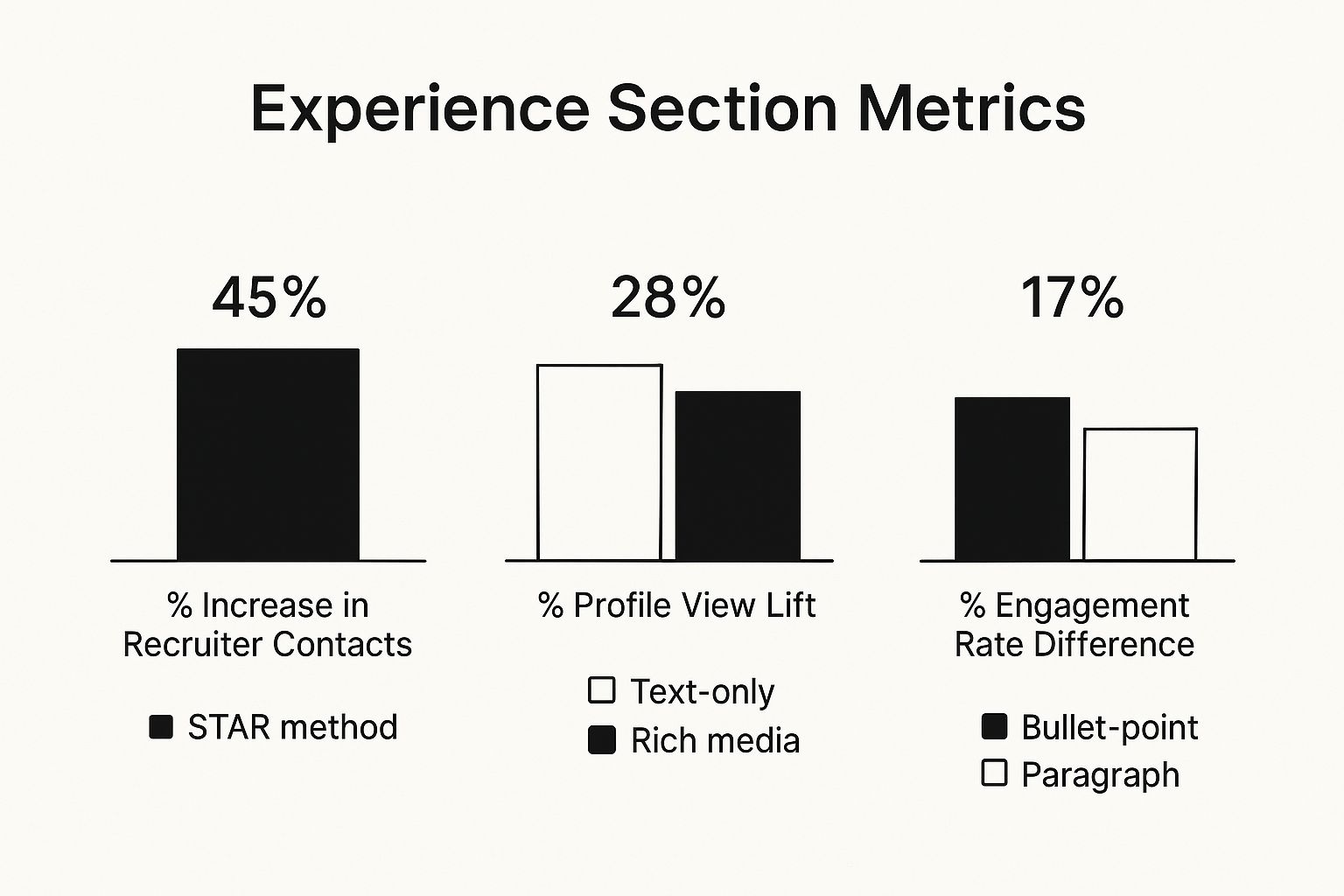
As you can see, framing your wins with a clear structure and adding visual proof of your work makes a massive difference in how recruiters perceive your profile.
From Duties to Accomplishments
The first and most critical shift is to stop talking about tasks and start highlighting outcomes. "Managed social media accounts" tells a recruiter nothing. What happened because you managed those accounts? That's what they really want to know.
Take a few minutes to brainstorm your biggest wins in each job. Think about a tough problem you solved, a project you led, or a process you made more efficient. Once you have a few solid examples, it's time to reframe them to focus on the result.
Here’s what that looks like in practice:
Instead of: "Responsible for email marketing campaigns."
Try this: "Grew our subscriber list by 25% in six months through targeted email campaigns, which directly led to a 15% increase in qualified leads."
See the difference? One is a passive statement; the other is an active, impressive achievement that screams "results-oriented."
Frame Your Success With the STAR Method
One of the best frameworks I've seen for structuring your accomplishments is the STAR method. It’s a simple but incredibly effective way to provide clear, compelling evidence of your skills.
Here’s the breakdown:
Situation: Briefly set the stage. What was the challenge or project?
Task: What was your specific goal or responsibility?
Action: What concrete steps did you take? Use strong, active verbs here.
Result: What was the outcome? This is where you bring in the numbers—quantify your impact whenever you can.
The STAR method forces you to go beyond vague claims like "I'm a good leader" and provide concrete proof. It helps you tell a story that demonstrates exactly how you led a team to hit a tight deadline.
Let’s put it all together for a project manager role:
Situation: Our flagship software project was three weeks behind schedule and significantly over budget due to scope creep and poor cross-team communication.
Task: I was brought in to get the project back on track and deliver it within a revised timeline, all without compromising the final product's quality.
Action: To fix this, I implemented daily stand-up meetings to get everyone talking, worked with stakeholders to re-prioritize the backlog, and set up a new tracking system to monitor progress.
Result: We successfully delivered the project on time and came in 5% under the revised budget, saving a crucial client relationship in the process.
Now that is far more powerful than a simple bullet point like "Managed software projects."
Make Your Wins Easy to Find
How you format your experience is just as important as the words you use. Recruiters are scanning dozens, if not hundreds, of profiles. They don't have time to read dense paragraphs.
Break up your accomplishments using clean, scannable bullet points. Each bullet should highlight a single, powerful achievement. This makes your key contributions pop off the page.
And don't forget about the "Add media" feature! This is a fantastic way to provide tangible proof of your skills. Link to projects you’ve worked on, articles you’ve published, or presentations you’ve given. Adding rich media like this shows, rather than just tells, what you’re capable of and makes your profile far more memorable. Mastering this part of your LinkedIn profile is a total game-changer.
Let Others Do the Bragging: Using Social Proof to Build Credibility
You’ve told your story and laid out your experience. Now, it’s time to let other people vouch for you. This is where the Skills, Endorsements, and Recommendations sections come in—they are your social proof engine.
These features provide that crucial third-party validation that turns your claims into solid evidence. They tell recruiters that your abilities aren't just self-proclaimed; they're recognized by the people who have seen you in action.
Think about it. Anyone can write "great collaborator" on their profile. But a detailed recommendation from a former manager describing how you navigated a tough project to success? That’s concrete proof. This kind of external validation is a powerful signal of your professional value.
Curating Your High-Impact Skills List
Your Skills section isn't just a laundry list of everything you've ever done. Think of it as a curated, keyword-rich asset that directly supports your career goals. LinkedIn lets you add up to 50 skills, but the real magic is in the top three you "pin" to your profile. These are the first ones anyone sees.
So, how do you choose? Simple. Align them with the jobs you actually want. Pull up a few job descriptions for your target role and look for the most frequently mentioned skills, both hard and soft. Those are the exact keywords recruiters are plugging into their searches.
Your pinned skills should be your most relevant and impressive qualifications. For a software developer, this might look like:
Python (Programming Language)
Agile Methodologies
Amazon Web Services (AWS)
By strategically selecting and pinning your top skills, you make it incredibly easy for a recruiter to see you’re a match in a matter of seconds. It's a small step that can seriously boost your visibility.
To give you a clearer picture of why these small optimizations matter, let’s look at the data.
Impact of Key Profile Optimizations
This table shows just how much completing these sections can influence your profile's performance. As you can see, even small additions create a significant lift in how recruiters and your network see you.
Optimization Action | Potential Impact on Profile Performance |
|---|---|
Adding at least 5 relevant skills | Up to 27x more views from recruiters. |
Completing your profile fully (All-Star status) | Members are 40x more likely to receive opportunities. |
Including a professional headshot | Can lead to 21x more profile views. |
Having recommendations from connections | Significantly increases credibility and trust signals. |
These numbers aren't just abstract statistics; they represent real opportunities—more InMails, more interview requests, and more visibility for the right roles.
Turning Endorsements into Credibility Boosters
Endorsements are those quick, one-click validations from your connections. While they don't have the same depth as a full recommendation, a high number of endorsements for your core skills acts as powerful social proof. It shows a broad consensus that you really know your stuff.
Don't be shy about nudging people for them. The next time a colleague thanks you for your help, that's your cue. A simple, "Glad I could help! If you have a second, I'd really appreciate it if you could endorse my skill for [Specific Skill] on LinkedIn" works wonders.
A strong set of endorsements for your top skills quickly builds trust. It tells a visitor, "It's not just me saying I'm good at this—my network agrees."
And remember, it’s a two-way street. Make a habit of endorsing others for skills you know they possess. It’s a great way to maintain professional relationships and often prompts people to return the favor. To get the most out of this feature, our guide explains in detail what endorsements on LinkedIn are and how to make them work for you.
Securing Powerful Recommendations
A well-written recommendation is the ultimate form of social proof on your profile. It's a personal testimonial that adds context and personality to your experience. Because they take real effort from both you and the writer, they carry immense weight with recruiters.
The secret to getting a great recommendation? Make it incredibly easy for the other person. Never just click the button and send a generic request. Instead, personalize your message and gently guide them on what you’d love for them to highlight.
Here’s a simple, effective way to ask:
Choose the Right Person: Think about former managers, senior colleagues, or clients who worked closely with you and can speak to specific results.
Ask at the Right Time: The best time is right after a successful project wraps up or when you’re leaving a job on great terms. The positive experience is still fresh in their mind.
Make a Specific Request: Instead of a vague, "Can you write me a recommendation?" try something more focused. For example: "Hi [Name], I really enjoyed working with you on the Q3 product launch. Would you be willing to write a brief recommendation that speaks to my project management skills and how I led the team through that tight deadline?"
This approach takes the guesswork out of it for your recommender and helps ensure their testimonial backs up the skills you want to be known for. Trust me, a few glowing, specific recommendations are far more impactful than dozens of generic endorsements.
Engage Authentically to Bring Opportunities to You
Having a perfectly polished profile is a great start, but it's a passive approach. Real opportunities rarely fall into the laps of people who just wait to be found. The real magic of LinkedIn happens when you stop treating your profile like a static resume and start using it as a dynamic platform.
This is where authentic engagement comes in. When you share your insights and jump into conversations, you're actively showing what you know and building a reputation. You're no longer just a list of skills; you become a thinking, contributing professional in your community.
Develop a Simple Content Habit
You don't need a complex content calendar or a marketing team to make an impact. All it takes is a simple, consistent habit of sharing valuable information to establish yourself as a knowledgeable voice in your field.
The key is to go beyond just hitting the "like" button. Sharing your perspective, whether in an original post or a thoughtful comment, is what builds real connections and gets the right kind of attention from recruiters and peers.
Think about what you're learning right now, the problems you’re solving at work, or the industry trends you're keeping an eye on. These are all fantastic starting points for content.
Share your wins and what you learned. Just finish a tough project? Post about the key takeaways or an unexpected lesson you learned along the way.
Discuss what's happening in your industry. Find an interesting article about your field and share it with your own two cents. What's your take on the latest news?
Ask a great question. Spark a conversation by asking your network for their opinions on a common challenge or a future trend.
This isn’t about bragging. It’s about showcasing your thought process and passion for what you do, making you visible in a way your profile alone never could.
When you consistently share valuable insights, you shift from being a job seeker to a sought-after professional. Opportunities start finding you because you've proven your expertise out in the open.
The Underrated Power of Thoughtful Comments
If creating original posts feels like too much, start with comments. A well-written comment can often be more powerful than a simple "like" or even a post of your own. Why? Because it puts you directly into relevant conversations that are happening right now.
When you leave a thoughtful comment on a post from an industry leader or a company you admire, you're not just talking to the author. You're making your expertise visible to their entire audience, which often includes the exact recruiters and hiring managers you want to reach.
A great comment does more than just agree. It adds real value to the conversation by:
Offering a new perspective: Share a related experience or a different way of looking at the issue.
Asking a clarifying question: Show you're genuinely engaged and thinking deeply about the topic.
Providing an extra resource: Link to a relevant article or tool that adds to the discussion.
This approach demonstrates your knowledge and collaborative spirit, making you a memorable contributor instead of just another face in the crowd.
Why Engagement Matters More Than Ever
Understanding how the platform works can give you a real edge. LinkedIn isn't a static website; user behavior is always changing. For instance, engagement rates have been on a steady rise, growing from 4.48% in January 2024 to 5.42% by December of the same year. This upward trend shows that people are more active and receptive to quality content than ever. You can explore more of these LinkedIn engagement benchmarks to see for yourself.
This growth is a clear signal. By consistently sharing authentic and helpful content, you're tapping into a highly receptive audience. Your efforts to build your profile and engage with your community are more likely to be seen and valued, helping you build the kind of meaningful connections that lead to real career opportunities.
Answering Your Top LinkedIn Profile Questions
Even after you've polished every section, you're bound to have questions. LinkedIn is always changing, and what worked last year might not be the best approach today. Let's dig into some of the most common questions I hear from professionals trying to get their profiles just right.
Getting these details sorted out can be the difference between a profile that just sits there and one that actively works for you.
How Often Should I Update My LinkedIn Profile?
Your LinkedIn profile isn't a resume you dust off once a year. Think of it as a living document that grows with your career. I always tell people to schedule a quick check-in every three months. It's the perfect time to add any new skills you've picked up, projects you've wrapped up, or certifications you've earned.
Of course, some updates can't wait. If you get a promotion, start a new job, or crush a major project, update your profile immediately. You want that fresh achievement front and center.
Here's a pro tip: An active profile is just as important as a complete one. Simply sharing a great article or posting a thoughtful comment once a week keeps you visible. It’s a low-effort way to stay on your network's radar.
Should I Use the “Open to Work” Feature?
This is a big one, and the answer really depends on your situation. LinkedIn gives you two very different ways to use its "Open to Work" feature, and you need to choose wisely.
If you’re unemployed or in a position where you can be public about your job search, go for the green banner. It's a clear, unmissable signal to everyone—recruiters, old colleagues, your entire network—that you're available and looking.
But what if you're currently employed and need to be more discreet? The ‘Recruiters only’ setting is your best friend. This privately flags your profile for people using LinkedIn's premium Recruiter tools. The best part? It’s designed to hide your "Open to Work" status from people at your current company, letting you explore opportunities without raising any red flags.
What Are the Biggest LinkedIn Profile Mistakes to Avoid?
I see the same handful of small mistakes tanking otherwise great profiles all the time. The good news is they're incredibly easy to fix, and avoiding them will instantly put you ahead of the competition.
Be honest, are you guilty of any of these?
A Bad Photo: A blurry selfie or a cropped picture from a wedding just doesn't cut it. It immediately makes you look unprofessional.
A Boring Headline: Just putting your job title, like "Marketing Manager," is a huge waste of prime real estate.
A Blank 'About' Section: This is your chance to tell your story! Leaving it empty is like walking out of an interview after only giving your name.
A "Set It and Forget It" Attitude: A dead profile gets you nowhere. If you're not engaging, you're invisible.
Another classic mistake is just copying and pasting your resume into the Experience section. Your resume lists duties; your LinkedIn profile should show impact. Use numbers and results to bring your accomplishments to life.
It helps to remember just how massive the platform is. As of 2025, LinkedIn is home to over 1.15 billion users, and recruiters are using sophisticated filters to sort through them. To learn more, check out these insightful LinkedIn statistics and what they mean for you. Every little detail matters when you're trying to stand out in a sea that big.
Nailing these fundamentals ensures you’re not just on LinkedIn, but you're actively using it to pull in the opportunities you've earned.
Ready to stop guessing and start getting results? Job Compass transforms your job search by revealing exactly what recruiters see. Our AI-driven tools optimize your LinkedIn profile, identify key hiring contacts, and even help you craft the perfect outreach message. Stop applying blindly and start connecting strategically. Get started for free at https://jobcompass.ai.

